 OFF THE CLOCK
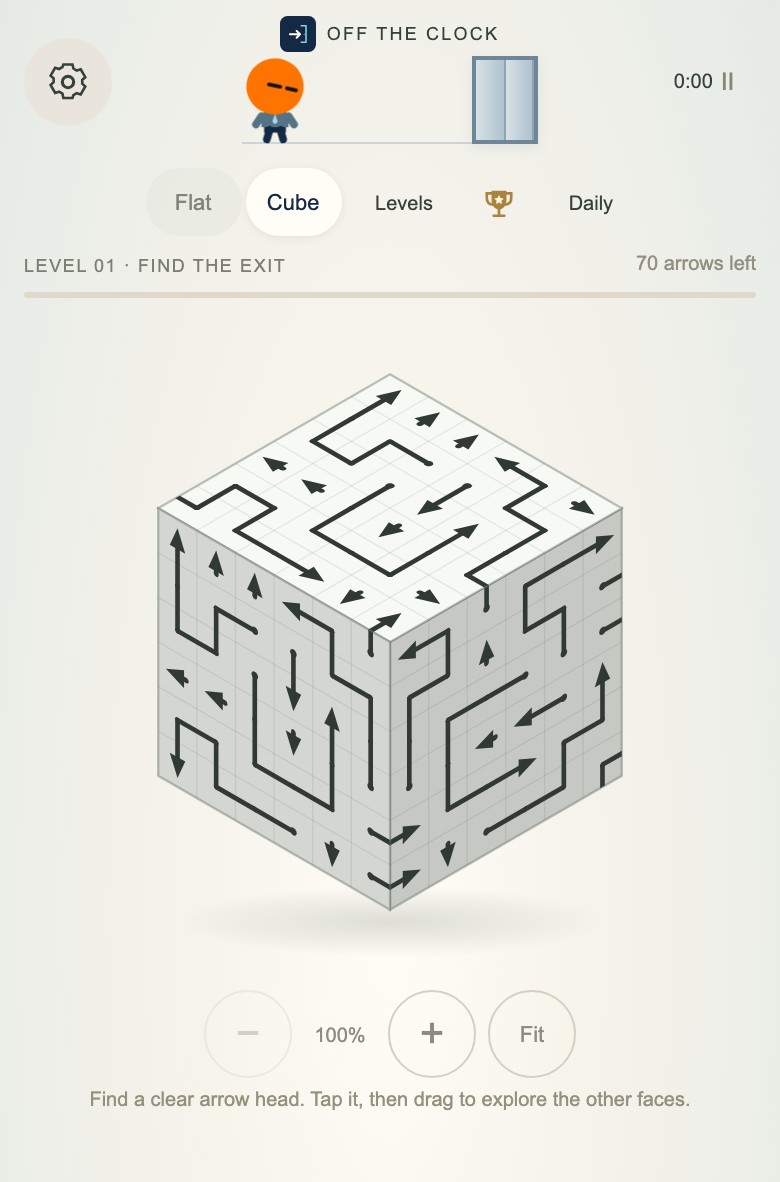
Open the free 3D arrow puzzle alongside this guide. Cube has 30 campaign levels, free Hint and Undo, and no account or app installation. The steps below describe this game’s rules; other games called “arrow cube” may work differently.
Find the head before choosing a move
It is easy to mistake a bend for the end of an arrow, especially where several dark lines meet. Follow one piece until you find its triangular head. If the line crosses a cube edge, rotate the view until you can see the rest of that piece.
Now look from the head toward the edge of its face, in the direction it points. Another arrow on that route can stop it, even if the square immediately in front looks empty. A long arrow with a clear exit can leave; a tiny arrow pointing into a busy lane cannot.
You do not need to understand all six faces at once. Find one head and check one exit.
What rotating the cube does—and does not do
Drag an empty area to turn the cube. The arrows keep their positions and directions. You are moving the camera around a fixed puzzle, rather than twisting rows as you would on a Rubik’s Cube.
An arrow’s body can wrap around an edge. Its head does not turn that corner to search for an exit: it continues straight out from the face it is on. This is why tracing the whole winding shape and checking the head’s exit are two different steps.
If the angle becomes awkward, press Fit. Use the zoom buttons, or pinch on a touch screen, when neighboring lines are hard to separate. Holding an arrow lets you inspect its path without immediately releasing it.
A simple routine for a crowded cube
- Choose a face you can read. Turn it toward you rather than tapping at a steep angle.
- Find a head pointing toward an open edge. Check the entire lane, not just the next square.
- Tap the arrow if the lane is clear. You can tap its body as well as its head.
- Look at the space it leaves. A blocker may be gone from another arrow’s exit.
- Turn to another face when nothing stands out. You do not have to finish one face before looking elsewhere.
Suppose a right-pointing arrow has one piece between its head and the right edge. Look at that blocking piece. If its own exit is clear, remove it, then check the first arrow again. If it is also blocked, follow that next blocker. You are tracing a dependency, not guessing a complete solution order.
This is a general example, not a numbered-level solution. For a smaller interactive example of the same clear-path rule, try the three-arrow practice board.
Can clearing the wrong arrow ruin the cube?
In Off The Clock’s Cube mode, a legal removal only takes a piece away. It does not add a wall or rotate another arrow, so a solvable board stays solvable. You can take a clear exit without worrying that a different clear exit was the only correct choice.
That rule changes in Shift: there, a departure turns linked arrows, and the order can leave a board stuck. The blocked and unsolvable puzzles guide explains the difference.
Where are Hint and Undo?
Open the game menu using the gear button. Hint helps you find an available move; Undo restores the previous move if you want to inspect it again. Both are free in Cube. A blocked tap costs no move.
When you use a hint, take a moment to see why that piece can leave. The useful part is learning to recognize the open lane on the next face. If you are spending more time managing the view than solving the puzzle, switch to Flat for the same removal rule on one plane.
Can I play on a phone without downloading an app?
Yes. Cube runs in a modern mobile or desktop browser. On a phone, drag to rotate, pinch to zoom and tap to release an arrow. An internet connection is needed to load the game and its puzzles.
Your progress stays in the same browser on the same device. It does not automatically follow you to another phone. Flat and Cube have progress export and import in the Levels panel; the browser-play guide explains what to save before clearing site data.
Is there a timer?
Cube displays elapsed time and keeps personal bests. If you specifically want a board with no timer displayed, choose Shift’s untimed arrow puzzles. Shift adds linked turns, so read the move preview before releasing anything.
Return to Cube, turn one face toward you, and find one head with a clear lane. You can leave the other five faces for a moment.